To learn more about the Student Manager in the Classic Version of ESGI, click here.
Overview
All students previously assessed in ESGI can be found in Student Manager whether in a teacher's class or part of a Pre-Assessment screening. Students can be created, added to a teacher's class, or can be moved from one class to another class by using Student Manager, but only if the teacher's account is linked to the school or district.
Note: Manually adding a student who already exists in Student Manager will create a duplicate and the previous test data will not be shown.
How to Assign Students to Your Class Using Student Manager:
1. Select Student Manager from the column on the left side of the home screen.
2. Using the Search by student name or ID field (see Image 1), enter the name of the student you would like to add to your class. If the student is in Student Manager, the student's name will be display as it is typed out. Alternatively, you can manually locate the student by using the left and right arrow  buttons located at the top right of the Student Manager.
3. Check the box to the left of the student’s name (see Image 1).
Note: To add multiple students to your class at once, select the checkbox next to each student’s name whom you wish to include.
4. After at least one student has been selected, click on the ASSIGN/UNASSIGN button that appears in the bottom right corner of your screen (see Image 1).
5. From the Assign/Unassign modal, select any of your classes and groups that you wish to assign this student to from under the list that appears and click SAVE CHANGES (see Image 2).
Note: A counter will appear at the bottom right of the Assign/Unassign modal which represents the number of selected classes/ groups that the student is about to be assigned to.
6. An on-screen notification will appear at the bottom of your screen informing you that the selected student has been added to your selected class (see Image 2).
7. When you are finished adding students, all of the added students will now appear on the class list within the student manager, as well as in the class list on your teacher homepage.
Note: To view previous year test scores, the exact same assessments must be added to your Home Screen. A student's final test score from the previous school year will become the Baseline score for the current school year.
Image 1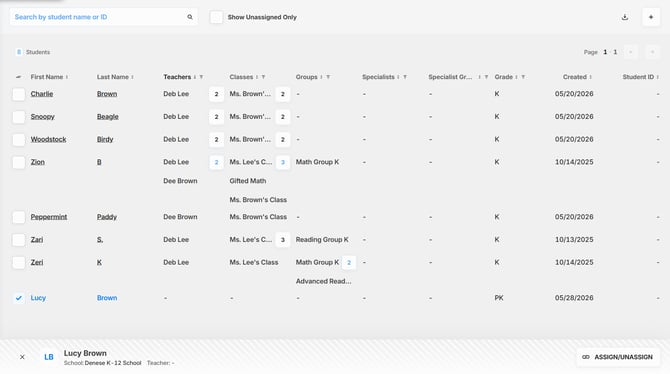
Image 2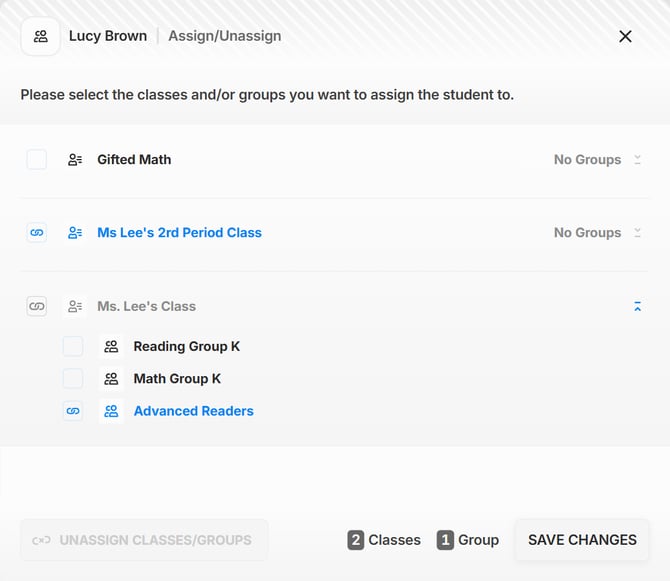
Checking Student Sharing Associations in Student Manager:
Using the Student Manager, you can see any associations for Students who are being shared between multiple Teachers and/or Specialists.
1. Select Student Manager from the column on the left side of the home screen.
2. Using the Search by student name or ID field (see Image 1), enter the name of the student whose Student Sharing associations you would like to check. If the student is in Student Manager, the student's name will be display as it is being typed out. Alternatively, you can manually locate the student by using the left and right arrow buttons located at the top right of the Student Manager.
3. Once you've located the desired student, click on the number that appears under the Teachers, Classes, Specialists, or Groups columns to expand the list and see all of the sharing associations (see Image 1).
Creating New Students in Student Manager:
You can create a new student to add to your class from within the Student Manager.
Note: Manually adding a student that already exists in Student Manager will create a duplicate record of the student.
1. Select Student Manager from the column on the left side of the home screen.
2. Click on the  Button located at the top right of the Student Manager (see Image 1).
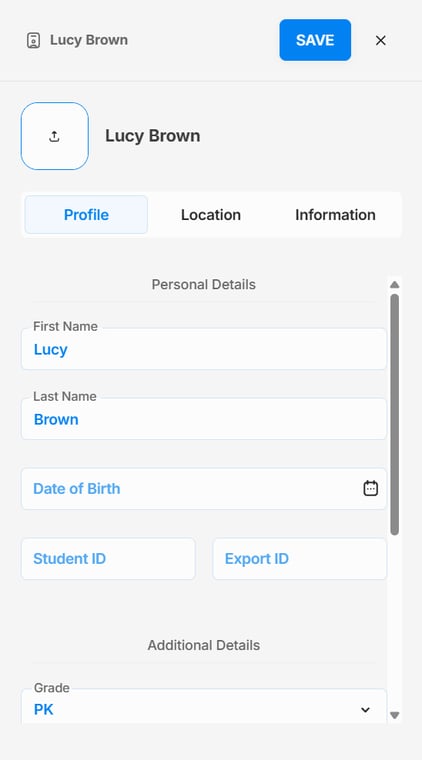
3. Enter the student's information on the Student Profile pop out menu (see Image 3), then click SAVE.
4. If the student already exists in ESGI, you will receive a popup message with two options:
- Cancel exits out of the Student Profile pop out.
- Create Duplicate Student creates another duplicate record for that student which will not have any previous test data that may have been collected.
5. Select the Location tab after the Profile tab to assign the student to any of your classes and/or groups.
6. Lastly, click on the Information tab to the right of the Location tab to enter the following optional details for the student:
- Student picture
- Race and Ethnicity
- Lunch Status
- Special Programs
- Comments
6. Click on the Save button at the top right of the Student Profile pop out when you are done.
7. Your new student is now added to your classroom and will appear under your class roster as well as in the Student Manager.
Image 3