To learn how to reorder Subject Tabs in the Classic Version of ESGI, click here.
Overview:
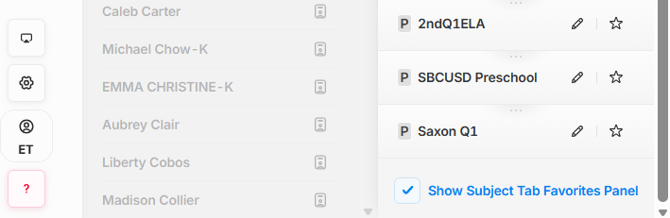
The Subject Tab order can be edited directly from the Subject Tab dropdown at the top of the Home Screen. Teachers can edit their own gray Subject Tabs but cannot reorder purple or blue Subject Tabs managed by their District or School Admin.
Rearrange Subject Tabs from the Home Screen
1. Expand the Subject Tab Dropdown by clicking on the dropdown icon  at the top of the homepage screen.
2. Drag and drop Subject Tabs by clicking on the ellipses  button located above a Subject Tab's name and rearranging them in any order that you would like.
Note: When hovering your cursor over the button, you will know you're able to rearrange the Subject Tab when it becomes highlighted in purple and your cursor turns into a hand. Once you click and drag, it will then turn blue. The Subject Tabs will be arranged across the top of the page in the same order that it is in the dropdown list (see Image 1).
3. Changes will automatically be saved and applied, so once you have finished arranging your Subject Tabs into the desired order, click on the  button at the top right of the Subject Tab title to close out of it.
4. You can check/uncheck the box titled: Show Subject Tab Favorites Panel to hide or unhide the Subject Tabs across the top of the page.
Image 1
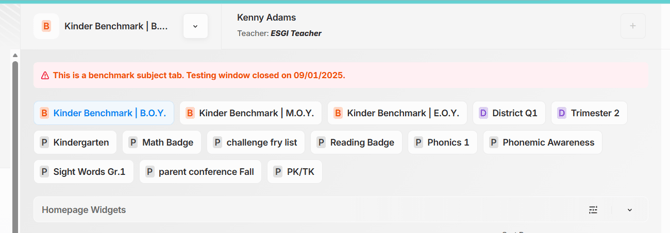
Image 2